All about Soot (draft)
- Official Soot documents
- Tutorials
- SootTutorial A step-by-step tutorial for Soot
- Soot入门(1): 安装与生成Jimple文件
A Survivor's Guide to Java Program Analysis with Soot 简直是救世主!!! 里面的代码是 Latin1 编码的, 转换成 UTF8 好点.
find . -name '*.java' -exec iconv -f latin1 -t utf8 -o \{} \{} \;
- Theses
- Sable thesis: An 107-page-long thesis by Raja Vallee-Rai, which gives much information about Soot, especially the Jimple grammar.
1. Preliminaries
JVM 4 种函数调用
- invoke special: call constructor, superclass methods, private method
- invoke virtual: normal instance method call (virtual dispatch)
- invoke interface: like invoke virtual, but cannot optimize, additionally, check interface implementation
- invoke static: call static methods
- invoke dynamic (after Java 7): allows dynamic typing language to run on JVM (Java is static typing)
2. Basic concepts
Soot has its own class path, which by default is empty. When specifying
class path of Soot using -cp, do not use ~. Instead, use absolute
or relative paths.
Jimple 尖括号中为 method signature: class-name: return-type method-name
(parameter-type1, ...)
2.1. Three types of classes
There are three kinds of classes (these are classes analyzed by Soot, not the ones owned by Soot):
- argument class: specified explicitly in Soot cli as argument, also become application class
- application class: classes that Soot analyzes, transforms, and turns into output files
- library class: classes which are referred to, directly or indirectly, by the application classes, but which are not themselves application classes. Only used for type resolution.
Since argument classes automatically become application classes, there are inherently only two classes—application class & library class.
When you use the -app option, however, then Soot also processes all
classes referenced by these classes. It will not, however, process any
classes in the JDK, i.e. classes in one of the java.* and com.sun.*
packages. If you wish to include those too you have to use the special
–i option, e.g. -i java.
2.2. Packs & phases
The execution of Soot is separated into several phases called packs.
The role of a pack
b: body creationt: user-defined transformations. This is of special interest since it allows us to inject custom analysis.o: optimizationsa: annotation (attribute generation)
2.2.1. Whole Program Analysis Packs
Before running the aforementioned packs, some packs are run
wjpp: herewstands for whole-program.cg: call-graph generationwjtp: whole Jimple transformation packwjop: whole Jimple optimization pack (this is disabled unless-Wis specified)wjap: whole Jimple annotation pack
The information generated in these packs are made available to the rest
of Soot through Scene.v().
2.2.2. Cli Options
To show help:
-pl,-phase-list: Print list of available phases-ph PACK,-phase-help PACK: Print help for the specifiedPACK. HerePACKcan be either generic (e.g.jop), or specific (e.g.jop.cpf)
To set an option to a pack, use -p or -phase-option in the form of
-p PACK OPTION:VALUE, which sets PACK's OPTION to VALUE, e.g. to
turn off all user-defined intra-procedural transformations (in pack
jtp):
soot -p jtp enabled:false ...
4. Soot in cli
soot -v -process-dir code/ -d out
soot -cp . -pp Circle
soot -cp . -pp Circle -p cg.spark verbose:true,on-fly-cg:true
Cli options are defined in src/main/xml/options/soot_options.xml.
5. Different IRs
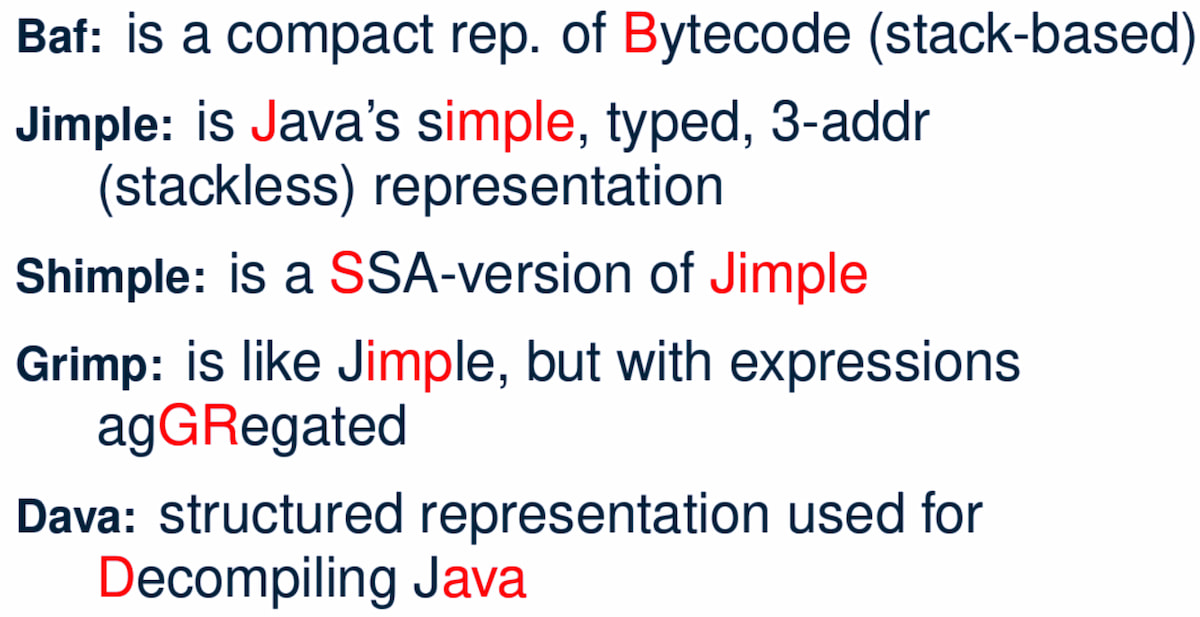
5.1. Baf
Baf is
- a compact representation of bytecode
- stack-based
The common interface is soot.baf.Inst.
Available optimizations are in soot.baf.toolkits.base.
5.2. Jimple
Jimple is
- typed: all local variables are typed
- stackless
- 3-address (statements reference at most 3 local variables or
constants)
- this requires linearization of some complex expressions, e.g.
a*b +
    c*d
is converted to multiple 3-address statements.
- this requires linearization of some complex expressions, e.g.
For a complete explanation of Jimple, see section Jimple.
5.3. Shimple
Shimple is
- SSA-version (Static Single Assignment) of Jimple: each local variable
has a single static point of definition.
- this introduces a Phi node.
5.4. Grimp
Grimp preserves new operator and complex expressions (no
linearization).
5.5. Dava
6. Main implementation classes
Thses are implementation classes of Soot, i.e. they are owned by Soot. For a classification of classes analyzed by Soot, see this section. Fig. 2 shows fun-call relations of some of the most important classes.
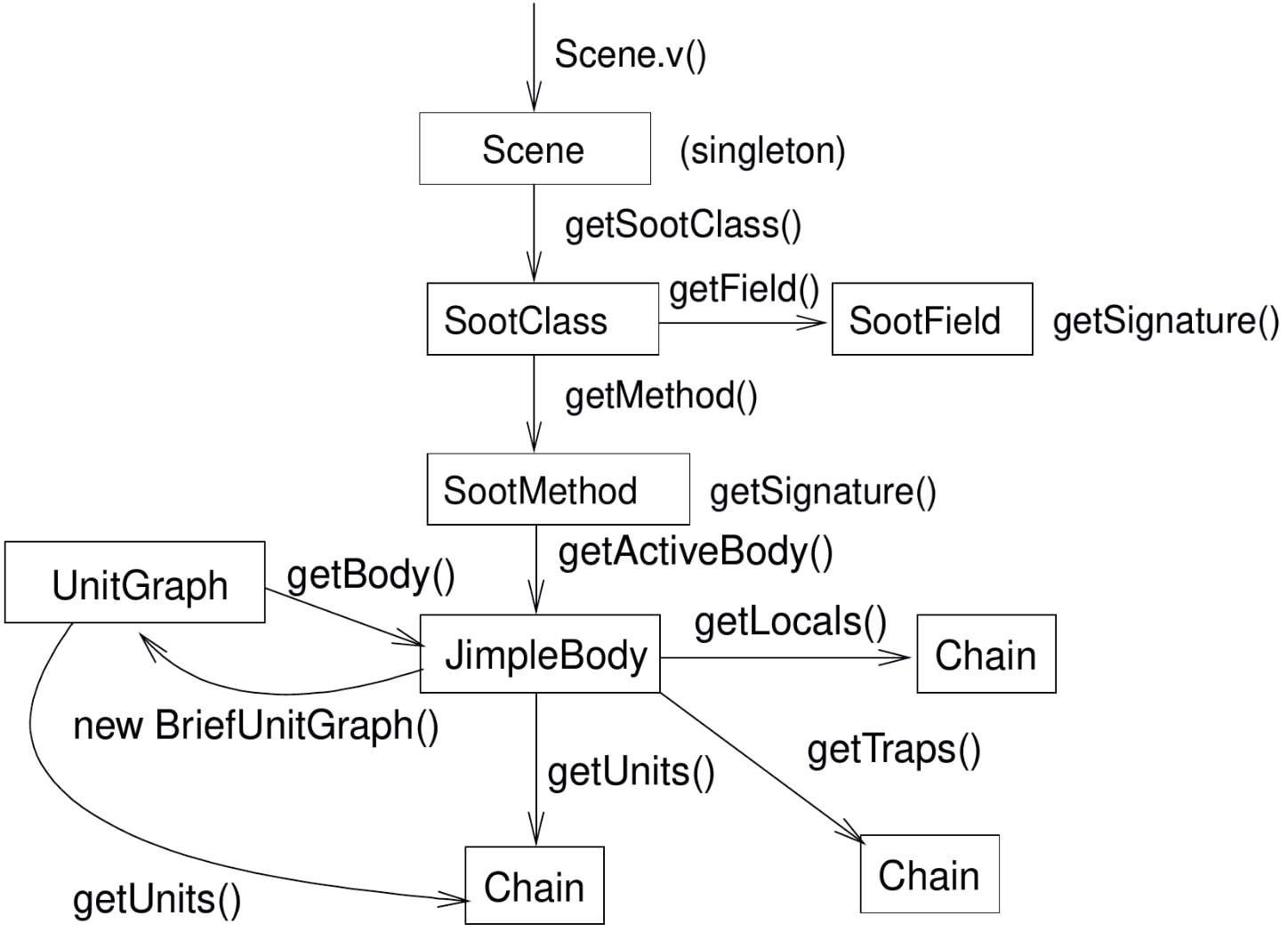
SceneManages theSootClasses of the application being analyzed.SootClassSoot representation of a Java class. They are usually created by aScene, but can also be constructed manually through the given constructors.// for methods SootMethod getMethod(String subsignature); SootMethod getMethod(String name, List<Type> parameterTypes); SootMethod getMethodByName(String name); int getMethodCount(); List<SootMethod> getMethods(); // for fields, alike Chain<SootField> getFields();
SootMethodBody,JimpleBody
SootFieldUnitUnitGraphExceptionalUnitGraph: useExceptionalUnitGraphFactory.createExceptionalUnitGraph()to create
6.1. Scene
Scene is a singleton class that keeps all classes which are
represented by SootClass. Each SootClass may contain several
methods (SootMethod) and each method may have a Body object that
keeps the statements (Units).
Scene
There are two scenes:
soot.Scene: which manages all theSootClasses being analyzed.soot.ModuleScene: a subclass ofSceneused to analyze Java 9 modules.
Methods of soot.Scene:
loadClassAndSupport(String className): loads the given class and all the required support classes.loadNecessaryClass(String name)protected void loadNecessaryClass(String name) { loadClassAndSupport(name).setApplicationClass(); }
loadNecessaryClasses(): loads the set of classes that soot needs, including those specified on the command-line. This is the standard way of initialising the list of classes soot should use.The classes specified in the command-line include:
individual classes specified in command-line. e.g.
java soot.Main
    -cp . -pp A B
, thenopts.classes()returns the list{"A", "B"}.for (String name : opts.classes()) { loadNecessaryClass(name); }
-process-dir: all classes specified in directoriesfor (String path : opts.process_dir()) { for (String cl : SourceLocator.v().getClassesUnder(path)) { SootClass theClass = loadClassAndSupport(cl); if (!theClass.isPhantom) { theClass.setApplicationClass(); } } }
6.2. SootMethod
SootMethod
getActiveBody()throws an exception when no active body is present. This cannot be called beforePackManager.v().runPacks();inMain.retrieveActiveBody()will construct an active body if none is present.
6.2.1. Printing a Method
In soot.Body::toString(), Printer.v().printTo() is used to print a
method body:
Printer.v().printTo(this, writerOut);
6.3. SootField
6.4. Graph
Different kinds of graphs (partial)
DirectedBodyGraph (I)
    ExceptionalGraph (I)
        CompleteUnitGraph (C)
        ExceptionalUnitGraph (C)
            CompleteUnitGraph (C)
        CompleteBlockGraph (C)
        ExceptionalBlockGraph (C)
            CompleteBlockGraph (C)
    CompleteUnitGraph (C)
    ExceptionalUnitGraph (C)
        CompleteUnitGraph (C)
    BriefUnitGraph (C)
    TrapUnitGraph (C)
    UnitGraph (C)
        ExceptionalUnitGraph (C)
            CompleteUnitGraph (C)
        BriefUnitGraph (C)
        TrapUnitGraph (C)
7. Jimple
A complete description of the Jimple grammar can be seen in Figure 2.9 and 2.10 of the Sable thesis.
The common interface is soot.jimple.Stmt.
There are 15 Stmts (Stmt is instance of Unit)
- Core statements
NopStmtDefinitionStmt: its left op can either be a primitive (PrimType) or a ref-like type (RefLikeType). To check:if (defStmt.getLeftOp().getType() instanceof RefLikeType) { // ... }
IdentityStmt: assigns parameters andthisreference to local variables. This ensures that all local variables have at least one definition point.r0 := @this; i1 := @parameter0;
AssignStmt
- Intra-procedual control-flow statements
IfStmtif r1 != null goto label0;
In a
BranchedFlowAnalysis, there're two flows out of anIfStmt: the fall-through flow and branched flow.GotoStmtSwitchStmtTableSwitchStmtLookupSwitchStmt
- Inter-procedual control-flow statements
InvokeStmtReturnStmtReturnVoidStmt
- Monitor statements: for mutual exclusion
EnterMonitorStmtExitMonitorStmt
ThrowStmt: throws an exceptionRetStmt: not used; returns from a JSR- JSR & RET are JVM instructions for subroutine. It seems that they are deprecated Java bytecode, as using them causes more harm than good. According to this mail and its reply, JVM subroutines (JSR & RET) "cause huge problems with analysis and optimization" and are removed by Jimple's JSR inliner.
The local variables which start with a dollar sign (
$) represent stack positions and not local variables in the original program whereas those without$represent real local variables e.g.i0in the main method corresponds toain the Java source.
The main structure of a Jimple method (from Section 2.3.6 of the Sable thesis):
- All local variables are declared at the top of the method.
- Identity statements follow the local variable declarations, which marks the local variables that have values upon method entry.
- Then comes the method body, which are mostly assignment statements.
- See the Hierarchy For Package soot.jimple.internal, all statements are
under
soot.AbstractUnit→soot.jimple.internal.AbstractStmt.
7.1. FieldRef
FieldRef 分为 InstanceFieldRef 和 StaticFieldRef
FieldRef (I)
|- InstanceFieldRef (I)
|  |- JInstanceFieldRef (C, for Jimple)
|  |- GInstanceFieldRef (C, for Grimp)
|  `- ...
|- StaticFieldRef (C)
`- ...
7.2. Labels
Labels are displayed using Printer.
8. Body
Body has three chains
- Units chain: the actual code. Jimple provides the
Stmtimplementation ofUnit, while Grimp provides theInstimplementation. - Locals chain: local variables
Traps chain: trap handlers, in the form of
catch java.lang.Exception from label0 to label1 with label2;
9. Value
Value
Local: a local variableJimpleLocal
Expr: expression. AnExprcarries out some action on one or severalValues and returns anotherValue.- package
soot.jimpleBinopExprNewExprNewArrayExprNewMultiArrayExpr
- package
soot.jimple.internalJCastExpr- …
- …
- package
ImmediateConstant
RefParameterRefCaughtExceptionRefThisRef
9.1. ValueBox
A ValueBox is a pointer to some value. It can be visualized as a box
containing some value.
getValue(): dereferences the pointersetValue(): mutates value in the box- A unit has both DefBox & UseBox
getUseBoxes()returns a list ofValueBoxes, corresponding to allValues used in the unit.getDefBoxes()returns allValuess defined in the unit.- For example, for unit
x=y*z, there're 3 use boxes:[y*z](anExpr),[y](aLocal), and[z](anotherLocal); and one def box:[x](aLocal). The brackets ([]) represent the box.
For example, the following Java code
int a = 12;
int b = 24;
int x = a * b;
is translated to
a = 12;
b = 24;
temp$0 = a * b;
x = temp$0;
The DefBox & UseBox of each statement is as follows
a = 12
  Def:
    LinkedVariableBox[JimpleLocal: a]
  Use:
    LinkedRValueBox[IntConstant: 12]

b = 24
  Def:
    LinkedVariableBox[JimpleLocal: b]
  Use:
    LinkedRValueBox[IntConstant: 24]

temp$0 = a * b
  Def:
    LinkedVariableBox[JimpleLocal: temp$0]
  Use:
    LinkedRValueBox[JMulExpr: a * b]
    ImmediateBox[JimpleLocal: a]
    ImmediateBox[JimpleLocal: b]

x = temp$0
  Def:
    LinkedVariableBox[JimpleLocal: x]
  Use:
    LinkedRValueBox[JimpleLocal: temp$0]
10. Type
Class hierarchy of Type:
Type
|- PrimType: including int, float, char ...
|  |- BooleanType
|  |- CharType
|  |- IntType
|  `- ...
|- RefLikeType
|  |- ArrayType: array reference
|  |- NullType
|  `- RefType: simple reference
`- VoidType: void
11. Analyses
11.1. Off-The-Shelf Analyses
- Null Pointer Checker
jap.npcjap.npcolorer
- Array Bound Checker
jap.abc
- Liveness Analysis
jap.lvtagger
11.2. Custom Analyses
Inject custom inter-procedural analyses into wjtp pack and
intra-procedural analyses into jtp pack.
public class MySootMainExtension {
    public static void main(String[] args) {
        // Inject the analysis tagger into Soot
        PackManager.v().getPack("jtp")
            .add(new Transform("jpt.myanalysistagger",
                               MyAnalysisTagger.instance()));
        // Invoke soot.Main with arguments given
        Main.main(args);
    }
}
11.2.1. Very Busy Expressions Analysis
- dataflow_analysis.pdf very good explanation
- Lecture18.4up.pdf another explanation
The goal of Very Busy Expressions analysis is to compute expressions that are very busy at the exit from each program point.
An expression is very busy if, no matter what path is taken, the expression is always used before any of the variables occurring in it are redefined.
This is a must analysis, since if in either one of the path, the expression \(e\) is not used, it is not considered very busy.
This is a backwards analysis, as the fact at node \(d\) is deduced from later (TODO: change word) nodes.
For expression \(e = x + y\) from node \(s\) to \(p\), if either \(x\) or \(y\) is redefined along the path, then even if \(p\) uses expression \(e\), it's not very busy at \(s\).